Go Tool Base
The Intelligent Lifecycle Framework for Go CLIs
Modern CLI tools and DevOps workflows demand more than basic flag parsing. GTB works as a "batteries-included" micro-framework, providing a standardized foundation for building mission-critical tools with built-in agentic workflows, hardware-backed credentials vaults, OpenTelemetry observability, and zero-config service management.
Why GTB?
Before diving into code, we highly recommend reading our positioning guides to understand if GTB is the right fit for your next project:
- What is GTB?: Core philosophy, "IS / IS NOT" framing, and the 8 key advantages.
- Framework Comparison: Direct comparisons with Cobra, Viper, urfave/cli, and web frameworks.
- Coming from other Ecosystems?: A translation guide for developers migrating from PHP (Laravel), Ruby (Rails), or Python (Django).
Where the documentation lives
Four sections, each answering a different kind of question:
- Tutorials: start from nothing and end with something that runs. Begin with Build your first CLI.
- How-to guides: you know what you want to achieve; these are the steps.
- Reference: every command, flag and configuration key, with defaults and failure modes.
- Explanation: why the framework is shaped this way.
Overview
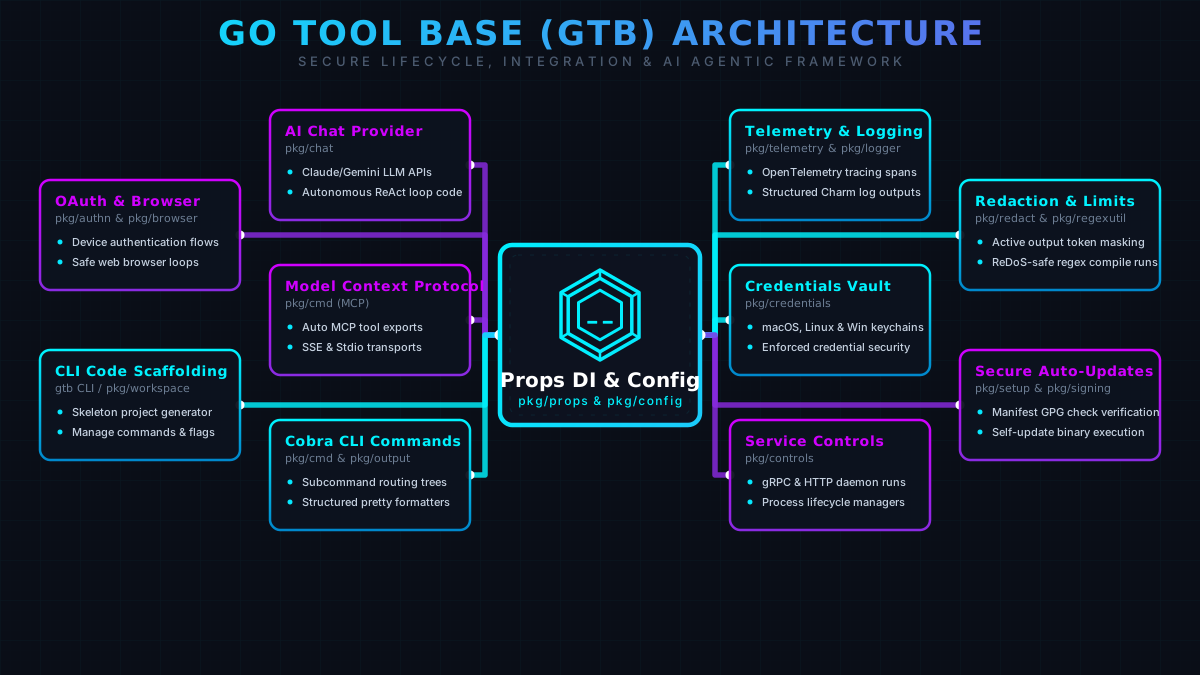
GTB accelerates development by providing a standardized Dependency Injection (Props) container pre-wired with essential features. It includes multi-source configuration, automatic version checking, structured logging, and an AI service layer: allowing you to focus entirely on your unique business logic.
Key Features
CLI Code Scaffolding
Generate skeleton projects, manage commands, and scaffold flags in seconds with the GTB toolchain.
AI Chat Provider
Integrated support for Claude, Gemini, and OpenAI APIs to power autonomous ReAct-style loops against your code.
Model Context Protocol
Expose your CLI commands automatically as MCP tools for external AI agents over the stdio transport.
Telemetry & Logging
Built-in OpenTelemetry tracing spans and beautiful structured Charm log outputs for zero-config observability.
Credentials Vault
Native integration with macOS, Linux, and Windows keychains to enforce robust credential security.
Secure Auto-Updates
Zero-config version syncing, GPG manifest verification, and self-update capabilities via GitHub/GitLab releases.
Built-in Commands
Every CLI tool built with GTB automatically includes the following commands with a cli tool:
init- Initialize tool configuration and setupversion- Display version information and check for updatesupdate- Update the tool to the latest versiondocs- Interactive documentation browser with AI capabilitiesmcp- Expose your tool's capabilities via the Model Context Protocol
Quick Start
package main

import (
    "embed"
    "os"

    "gitlab.com/phpboyscout/go-tool-base/pkg/cmd/root"
    "gitlab.com/phpboyscout/go/errorhandling"
    "gitlab.com/phpboyscout/go-tool-base/pkg/logger"
    "gitlab.com/phpboyscout/go-tool-base/pkg/props"
    "gitlab.com/phpboyscout/go-tool-base/pkg/version"
    "github.com/spf13/afero"
)

//go:embed assets/*
var assets embed.FS

func main() {
    l := logger.NewCharm(os.Stderr, logger.WithTimestamp(true))

    p := &props.Props{
        Tool: props.Tool{
            Name:        "mytool",
            Summary:     "My awesome CLI tool",
            Description: "A tool that does amazing things",
            ReleaseSource: props.ReleaseSource{
                Type:  "github",
                Owner: "myorg",
                Repo:  "mytool",
            },
        },
        Logger:  l,
        Assets:  props.NewAssets(props.AssetMap{"root": &assets}),
        FS:      afero.NewOsFs(),
        Version: version.NewInfo("1.0.0", "", ""),
    }
    p.ErrorHandler = errorhandling.New(logger.ToSlog(l), p.Tool.Help)

    rootCmd := root.NewCmdRoot(p)
    root.Execute(rootCmd, p)
}
CLI in Action
See how Go Tool Base builds and executes interactive lifecycle commands in real-time:
Further reading
The blog carries a curated route through this subject: Building a command-line tool in Go collects everything written about it, ordered so you can start at the beginning rather than newest-first.
Ask phpbotscout

He answers questions about the projects over on the Discord, citing the docs where they already cover it, and offering to raise an issue where they don't. Bring a bug, an idea, or a questionable engineering decision.